
Frequently Asked Questions (FAQs)
This application is designed to allow UK VAT-registered businesses and/or agents to comply with Making Tax Digital (MTD) for VAT. It enables users to authorise with HMRC, view obligations, retrieve VAT return details, submit returns, and view payment and liability data.
This version of the application does not submit your income tax figures to HMRC as it does with VAT. However, with new submission rules expected form HMRC in the next few months, we expect to implement this service.
At the moment, the system allows small and medium-sized businesses to generate their income tax using the basic income??? criteria. That criteria will suffice for most businesses. However, businesses that will require additional customisation/criteria may be charged an additional fee for this service..
In order for you to be able to submit your VAT return you must do the following:
1) Set up a Government Gateway account here: https://www.gov.uk/log-in-register-hmrc-online-services
2) Create an account with us at: https://myvatonline.com/
3) Access your VAT account through our site: https://myvatonline.com/manage_vat_mvt.php
4) Follow the on-screen instructions and ensure that you select "Grant permission" when the screen appears
5) Once you grant permission you will be re-directed to your VAT submission screen.
6) Submit your VAT return: you may use either the automatic or manual submission.
Automatic submission: users may save all their financial details (receipts and expenditure) on our servers and automatically generate and submit their VAT returns to HMRC from the application. Payments may be entered through the Enter payment page and receipts may be entered through the Enter receipts page.
Manual submission: Alternatively, users may calculate their figures themselves and simply enter these figures into our VAT submission form before sending the figures to HMRC.
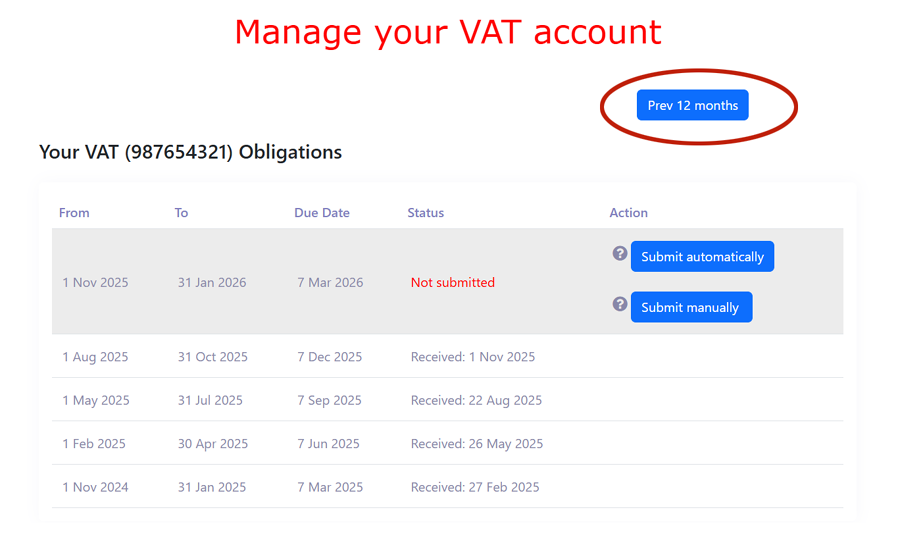
On the top right of the'Manage your VAT Account' page, you will see a 'Prev 12 months' button. Click on the button to see previous months' obligations. When you do this, a 'Next 12 months' button will also appear on the top left. We have highlighted the button in the image, below:
 .
.
Unfortunately we don't currently support automatic flat rate submissions as there is very little demand for it from our users. If we get enough requests for it, we will consider implementing it at some point in the future. For now, you might be able to work around the problem by using the manual submission method. From the "manage Your VAT" page, select the "Submit manually" button and submit your own figures.
The process of getting a refund is simple: all you have to do is submit your VAT return for the period that you seek a refund. HMRC will send you a payment a few days after receiving your VAT return. When you registered with HMRC, you indicated to them how you would like to be paid: most people give their business account. The refund will be made to that account..
The service is currently free to use for small and medium-sized users. Users who want their tax service customised may be charged a small fee, depending on the work they want done.